Skip to content
For teams that clean, maintain and repair buildings

Number One Unified App for Facility Management

Every job planned, tracked and invoiced from one screen — routes, tasks, checklists and hours in one place. See where your people are, what actually got done, and what goes on the invoice — the same day, not at the end of the month.


No card required · Support in Norwegian and English · Data hosted in the EU
12,000+ users across Europe 6 ERP & payroll integrations iOS & Android
AppsCo Workforce — operations overview on desktop and mobile
Route 3 · Tuesday
Storgata 12✓ 24 min
Kirkeveien 4✓ 41 min
Parkveien 9in progress
9 of 14 locations
EXTRA WORK
Parkveien 9 — burst pipe in basement
1.5 h · photo attached · Ola N.
To invoice2,150 kr
Over 12,000 people across Europe run their operations on AppsCo
AppsCo customer
AppsCo customer
AppsCo customer
AppsCo customer
AppsCo customer
AppsCo customer
AppsCo customer
AppsCo customer
AppsCo customer
AppsCo customer
AppsCo customer
AppsCo customer
AppsCo customer
AppsCo customer
AppsCo customer
Azets
Grilstad
Safbo
Lindex
Tratec
Annex Investments
King Oscar
The Walt Disney Company Nordic
Rotary
BDO
A day in operations

Four steps — and the same data runs through all four

Nothing gets retyped and nothing gets lost between the field and the office.

1Plan the route

A route template per contract; the whole week's visits are generated for you.

ROUTE 3 · MON–FRI
2Assign and send

The task lands on the worker's phone — address, equipment, time, checklist.

Ola N.ASSIGNED
Parkveien 9 · 08:30
Garage, bins, entrance
3Do the work on site

Automatic clock-in inside the site zone, checklist, photo, extra work in two taps.

Entrance and stairwells
Bins emptied
Burst pipe — reported
4Invoice and prove it

Hours and extra work become an order line; the client gets a weekly report.

Contracted18,400 kr
Extra work2,150 kr
To TripletexSent
New in the September 2026 release

Three screens run the whole day

A personal home page, a route planner that sequences the driving day, and one task board for everything else — plus a rebuilt mobile app for the field.
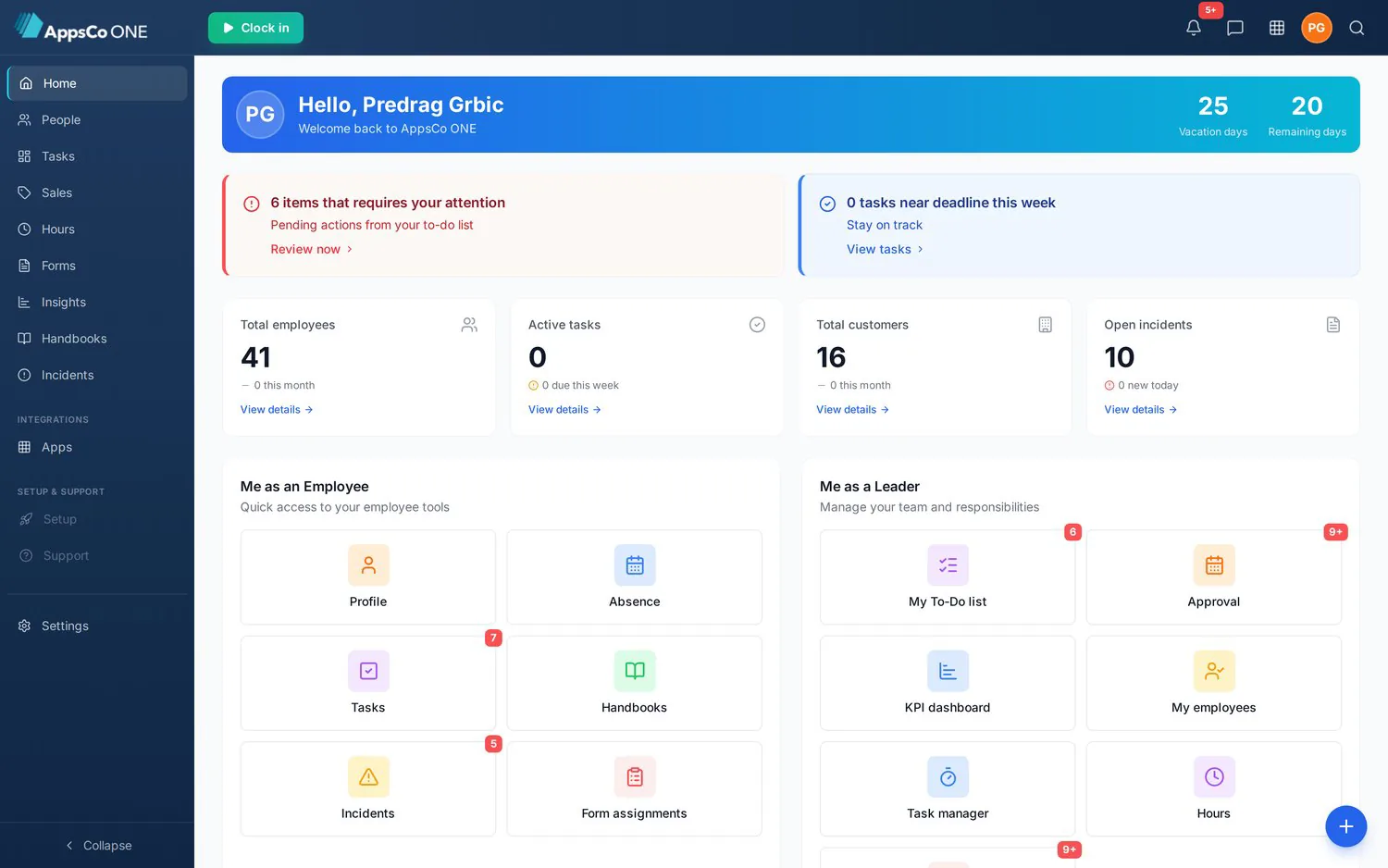
The personal home page in AppsCo — vacation balance, what needs attention and role-aware shortcuts
One home page per person
Balance, what needs attention, clock-in from any page
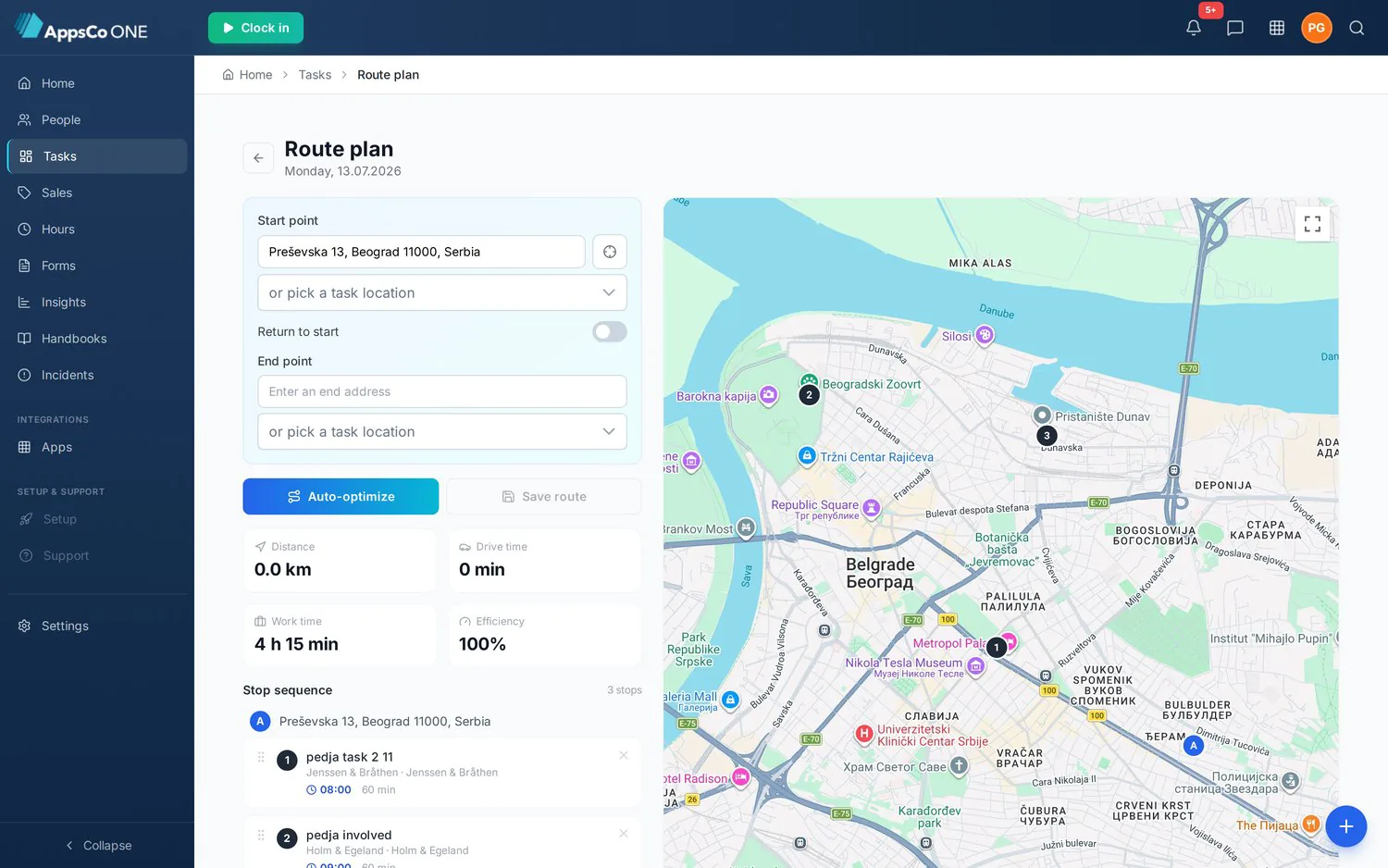
Route plan in AppsCo — auto-optimised stop sequence with arrival times, distance and drive time
Optimised driving day
Arrival times written back onto the tasks
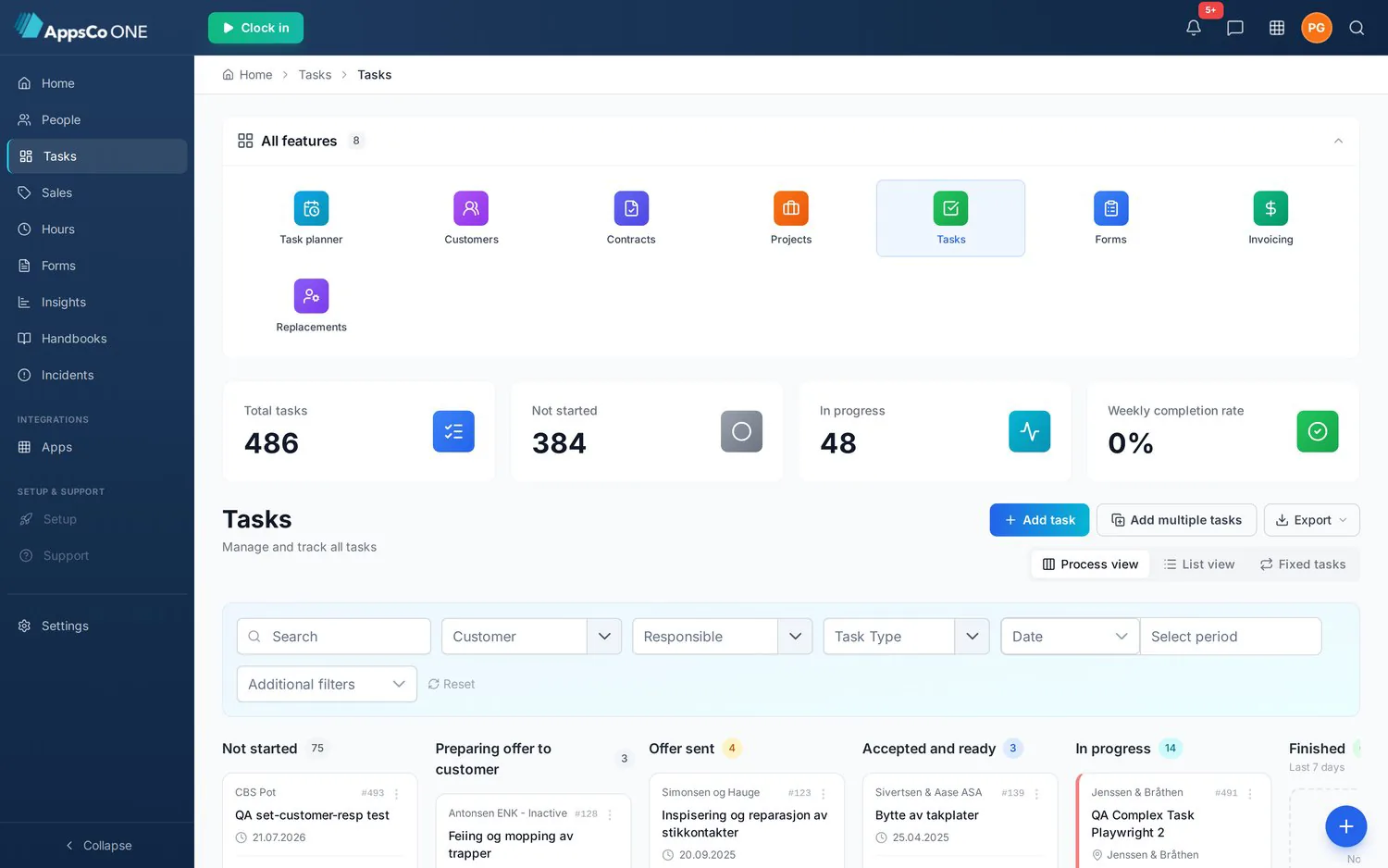
The tasks page in AppsCo — process board with counters and drag between status columns
Board, list and fixed tasks
One page, one view switch, filters that stay put
Task manager

Contracted visits generate themselves. Extra work never falls through.

Fixed visits from the contract enter the schedule automatically. When something extra shows up on site, the worker adds it in two taps — and it goes straight to the invoice, with a photo and a timestamp as proof.

Fixed and additional tasks, with deviations and approval
Leader view — everything that needs a decision on one screen
Product and service register, synced with your ERP
See how the task manager works →
AppsCo task manager — tasks by customer and status
Routes & GPS

See where your people are — and how long they stayed

The worker opens the phone in the morning and sees the exact order of locations for that day. You see where they've got to, how long they stayed and what they confirmed. When someone calls in sick, the route is reassigned.

Automatic clock-in
Geofence logs arrival and departure
Route templates
Weekly and seasonal plans in one click
Replacements
Reassign the route when a worker is out
Privacy
Clear about what a manager can and can't see
See how routes work →
Route 3 · Oslo city centre
9 of 14 locations · 41 km
Parkveien 9ON SITE
Ola N. · clocked in 08:41
41 km
driven today
0
missed visits
8
to invoice
27 min
avg. per site
TUESDAY 25 · ROUTE 3
14 locations · 07:00–15:00
Storgata 12DONE
07:10 · 24 min · checklist 6/6
Kirkeveien 4DONE
07:52 · 41 min · checklist 9/9
Parkveien 9ON SITE
clocked in 08:41 · checklist 6/9
Extra work added
Burst pipe · 1.5 h · photo
Bogstadveien 3
09:40 · planned
Finish location
Mobile app

The route card sits at the start of the day

The route card is the first thing the worker sees for that date — location count, order of visits and every task underneath. No digging through lists, no calling the office to ask what's next.


Works offline and syncs when coverage returns
Photo and timestamp attached to every completed job
Extra work and incidents reported on the spot
Get it on Google Play Download on the App Store
Checklist templates in AppsCo — by customer, site and job type
Checklists & reports

Proof the work was done — automatically, for every site

A checklist per job type, confirmation with photo and timestamp, and a weekly client report that writes itself. Fewer calls, faster sign-off on completed work.

Custom templates per contract and per location
Weekly client report without assembling it by hand
Incidents and HSE reports straight from the phone
Contracts & invoicing

From offer to invoice, without retyping into another system

Offer with tasks → approved contract → generated visits → order line with margin, inside your ERP. Customer register, site know-how and the full history of everything ever done there.

Tripletex Visma Lønn PowerOffice Go Fiken 24SevenOffice Quinyx
One record, four stages
1Offer
2Contract
3Generated visits
4Order line in ERP
All integrations →
Offers and contracts in AppsCo — approving an offer and turning it into a contract
Customer results

“The AppsCo Tasks Manager mobile app has helped us track and manage our business task flow on the go. It's user-friendly and a real time-saver — we highly recommend it.”

ØM
Øystein M.
CEO
−40%
time spent on admin
100%
of visits documented
3 days
faster to invoice

What you'll be able to measure from month one

Numbers you don't have today — because they live in people's heads and on paper in the van.

Missed visits

Which sites weren't served per contract — before the client calls to tell you.

Un-invoiced extra work

Work that got done and never billed — the quietest hole in your margin.

Calculate what it costs you →
Time on site vs. estimate

Whether a contract is actually profitable — per site and per team.

People & hours

HR that understands people who don't sit at a desk

Field hours feed payroll, absence and replacements don't wreck the schedule, certifications carry an expiry date, and an incident is reported from the phone — anonymously when that's what it takes.

Work hours & approvals
Clock-in from the field, overview per department
Absence & replacements
Calendar view and automatic cover on the route
Certifications & training
With expiry dates and reminders
Incidents & HSE
Risk level and measures, calculated for you
Work hours overview in AppsCo — dashboard and table view

Simple, transparent pricing for growing teams

Start free and add the modules you need. Same prices as on the pricing page.

Starter
Free
always
Everybody deserves great HR
Customizable people directory
Onboarding and offboarding
Customizable organization and groups
Social log in
Mobile — access your account on the go
Try it now
People HR
$70 + $6.9
$70/month + $6.9 per active user
When you want a little more — Core HR
Policy management
Time-off management
Incidents & measures
KPI reports
Publication builder
Mobile — access your account on the go
Try for free
MOST POPULAR
People Operations Hub
From $14.9
monthly / per user / maximum 30 users
When you want the all-in-one field tool
Streamline recurring tasks
Control and invoice tasks
Automate custom checklists
Improve communication with customers
Mobile — access your account on the go
Try for free
People Handbooks
$6
per person/year + $500 basic cost per year
When you want to keep your people updated
Personnel handbook (NO/UK)
HSE handbook (NO/UK)
Leader handbook
Contact us
People Apps & Access
When you want to simplify app management
Included
Single sign-on
Password manager
Standard integrations with ERP & payroll
API & toolkits
On request
User & app provisioning
2FA & device control
Dashboard & service desk
Audit & report log
Licence audit
Contact us

From the blog

Practical writing on running field operations.

All articles →

The questions we get before a rollout

If your question isn't here, write to us — we answer the same working day.

Ask a question →
Where is our data stored?

Data is hosted in the EU, with a DPA and full GDPR compliance. For public-sector buyers we provide processing and security documentation on request.

What do employees see when GPS is on?

The worker sees their own route and their own hours. Managers see site status and completion confirmations — within working hours, under rules your company sets.

How long does a rollout take?

For a team of up to 30 people, typically 1–2 weeks: importing customers and contracts, setting up routes and checklists, training leaders and field staff.

Does the app work without coverage?

Yes. Workers complete tasks and checklists offline, and everything syncs as soon as the phone is back on a network.

Bring one of your own routes to the demo

We'll put it into the system and show you in 20 minutes what your Tuesday looks like in AppsCo — with your sites, your contract and your prices.